CARDIAC › rust-cardiac › Demos › Voxel processing
Voxel processing on CARDIAC
Leveraging rust-cardiac for classic Comanche-style voxels
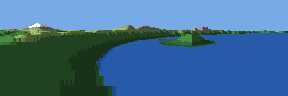
Voxel space is a terrain-rendering technique popularised by NovaLogic's Comanche (1992). Rather
than building the landscape from polygons, it renders a height map, a greyscale image of the terrain seen from
above in which brightness encodes elevation. The scene is processed in strips perpendicular to the view direction,
beginning near the camera and proceeding toward the horizon. Each strip is projected onto the screen one column at
a time, and a column is drawn only where the projected terrain rises above what has already been drawn in front of
it, so nearer terrain occludes farther terrain. The method requires only addition, multiplication and a single
division per column, which makes it a plausible workload for a machine as limited as CARDIAC.
This article adapts the technique to CARDIAC. The image above shows Crater Lake in Oregon from its south rim,
rendered from real elevation data as three 96 by 96 pixel views placed side by side. CARDIAC computes every pixel,
including each point's screen position, its terrain class and its shading. The program is written in Rust and
compiled with rust-cardiac rather than written directly in CARDIAC assembly, because the algorithm is considerably
easier to follow as a short Rust program than as the 87 cells of CARDIAC it compiles to. Later sections place the
two side by side.
Who does what
CARDIAC can't draw anything. It reads cards and outputs numbers. So the work is split the way a game splits it
between a graphics chip and the rest of the program. A small shell script plays the host. It reads a height map,
a picture of the land seen from above where brighter means higher. It slices the view into 120 strips, from right
in front of the camera out toward the far rim, and for each strip it hands CARDIAC the land under each of the
screen's 96 columns. CARDIAC hands back the screen row where that land shows up, and a colour code that says
what the land is and how brightly it's lit. That's the 3D part, the perspective and the light, and it all
happens on CARDIAC. The script then puts those answers on the screen, near strips first so that hills hide what's
behind them, looking each colour code up in a fixed table the way a display's palette does. It adds nothing of its
own to the picture except a plain sky.
Three pictures, three inputs
Here are the three pictures on their own, as CARDIAC drew them. They come from the same height map, with the
camera in the same spot on the rim, at the same height, with the same lens. The only difference is which way it
faces. Each picture covers 53 degrees across, so turning by exactly 53.1 degrees makes one picture start where the
last one ended, and Wizard Island carries on across the join.
 LOOK=281.9
 LOOK=335
 LOOK=28.1
MAP=craterlake.pgm CAMX=69.5 CAMY=170 CAMZ=140 ZOOM=2 HORIZON=30 BANK=0 \
  NEAR=0.5 FAR=165 WATER=0 FLAT=1 PALETTE=mountain LOOK=335 sh voxel.sh
The height map
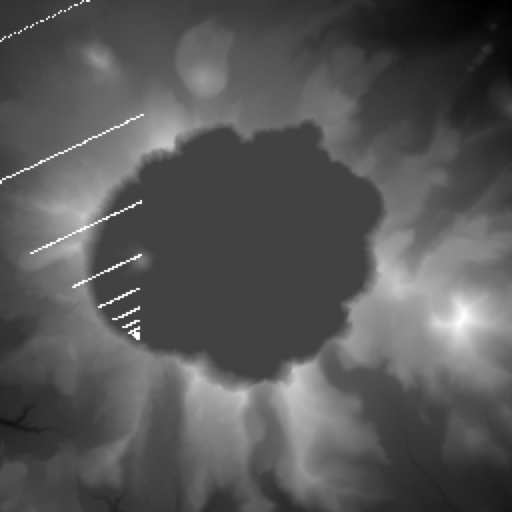
This is the input, craterlake.pgm, drawn as the image it is. It's a plain greyscale picture, 256
pixels on a side, where each pixel is 66 metres of ground and its brightness is the height, from 1,598 metres for
black to 2,701 metres for white. The lake is the big flat dark patch, perfectly level in the data, which is how
the script knows it's water. The red square is the camera on the south rim, and the white lines are every tenth
strip of the middle picture, the land that one run of the program gets. Near the camera the strips are short and
close together, so the foreground gets lots of detail. Farther out they get wider and farther apart, so the far
rim comes out coarser, the same way it would in a real flight game.
The heights are real. They come from the AWS Terrain Tiles, which are built from US Geological Survey and NASA
elevation data, cut to 256 by 256 and scaled to the 0 to 255 of a greyscale image. The file's comments say how
many metres a pixel is and which heights it spans, so the script can draw the land exactly as steep as it really
is.
From the height map to a strip of cards
The script turns the map into strips before CARDIAC sees any of it. Each strip is a line straight across the
view, a little farther out than the one before, and the script picks 96 evenly spaced points along it, one for
each column of the screen. At each point it looks up the land: its height, scaled to 0 to 49, and its colour,
which comes from the height (water, forest, meadow, rock or snow). It packs the two into one card, ten times the
height plus the colour. Then come two more cards, the height a little to the left of the point and a little to the
right, which CARDIAC uses to work out the light. Ahead of all that goes the row where the horizon crosses the
column.
So the deck for one strip is the strip's distance, the camera's height, and then four cards for each of the 96
columns. That's 386 cards, and it's all CARDIAC needs to know about the world. Heights only go up to 49 because of
what a card holds. The program works with 20 times the difference between the camera and the land, and that has
to fit between -999 and 999. Here's the part of the script that writes one strip's deck, in awk:
printf "%d %d", d, camera
for (col = 0; col < 96; col++) {
  x = (col - 48) * d / 48 / zoom           # across: as wide as the strip is far
  land(x - 2 * u, d); left = h             # the height a little to the left,
  land(x + 2 * u, d); right = h            # and a little to the right
  land(x, d)                               # sets h, the height, and c, the colour
  printf " %d %d %d %d", horizon, 10 * h + c, left, right
}
The program
Here's the whole thing. It reads the strip's distance and the camera's height, then reads one column at a time,
four cards each, and outputs two numbers back. A point that's below the camera shows up below the horizon, and the
farther away it is, the closer to the horizon it lands. CARDIAC has no divide instruction, so the program divides
by subtracting, a row at a time, which also stops at the edge of the screen on its own. The light is how much the
land rises from left to right. The sun is low on the left, so land rising to the right faces it and is lit
brightly, and land falling away is in shade.
voxel.rs
use cardiac::*;

fn main() {
    let d = inp();
    let camera = inp();
    for _ in 0..96 {
        let horizon = inp();
        let cell = inp();
        let left = inp();
        let right = inp();
        let height = cell / 10;
        let colour = cell % 10;
        let mut row = horizon;
        let below = camera - height;
        if below >= 0 {
            // below the horizon: a row down for each d in 20 (camera - h), stopping at the bottom
            let mut n = below * 20 - d;
            while n >= 0 && row < 96 {
                n -= d;
                row += 1;
            }
        } else {
            // above it: a row up for each d in 20 (h - camera), stopping at the top
            let mut n = -below * 20 - d;
            while n >= 0 && row >= 1 {
                n -= d;
                row -= 1;
            }
        }
        // the light: how much the land rises from left to right, held to -2..2, and moved up to 0..4
        let mut light = right - left + 2;
        if light < 0 {
            light = 0;
        }
        if light > 4 {
            light = 4;
        }
        out(row);
        out(colour * 10 + light);
    }
}
Many of these lines ask for something CARDIAC doesn't have. CARDIAC can add, subtract, shift, and test whether
the accumulator is negative, and that's all. Line 22 divides and line 23 takes a remainder. Line 28 multiplies by
20, line 50 multiplies by 10, and line 35 negates a value. Line 17 is a range loop with a counter. Line 29 joins
two tests with &&, and one of them, row < 96, compares with a number other
than zero, as row >= 1 on line 36 and light > 4 on line 46 do too. The tests on
lines 26 and 43 only ask whether a value is negative, and those are the only ones CARDIAC can do in a single
instruction. Every value is also an i16, which in Rust can go up to 32767, while a CARDIAC cell holds
-999 to 999.
rustc checks the program before cargo-cardiac ever sees it, the same way it checks any Rust. Every value here is
an i16, because that's what inp() returns, and rustc won't let it mix with another type
without a cast. A variable can only change if it's declared mut, and nothing can be read before it's
set. cargo-cardiac adds one rule of its own, which is Rust's rule about constants moved to the size of a card. A
constant past 999, like 1010 or 101 * 10, is refused at compile time. None of these
checks costs CARDIAC a cell, because they all happen before the program exists.
The inp() and out() calls on lines 15 to 21, 49 and 50 come from the
cardiac crate, which line 12 brings in. On CARDIAC each one is a single INP or
OUT instruction, straight into or out of the variable's own cell. With cargo run the
same program reads numbers from standard input and prints what it outputs, one per line, so the native build and
the CARDIAC build can be given the same input and compared. The native out() panics if it's given a
value that couldn't be on a card.
The build below says it uses the dev profile, which normally checks every add, subtract and multiply for
overflow. The listing has none of those checks, because rust-cardiac turns them off for its examples. They would
cost 47 more cells. With them voxel comes to 134 cells, and CARDIAC only has 96 for a program.
Building it also writes voxel.map, the panic map. It sits beside the deck the way a .pdb sits beside
an .exe, and CARDIAC never reads it. It says where the program's panic routine is, where each function starts, and
where each check is, with the message Rust would give for it. On CARDIAC a panic outputs -999 and halts, and
that's all the machine shows. When burn finds a map beside the deck, it works out which check led to the halt,
prints the function and the message the way Rust does, and exits with 101 as cargo run would. It
doesn't give a line number. voxel's map has a single line, fn 1 3 main, which says that
main starts at cell 03. There's nothing else in it, because voxel has no arrays to check the bounds
of, no assert!, and no overflow checks in this build, so nothing in it can panic. The collatz example
in the same repository is built with overflow checks on, and it shows what a failed check looks like when 3n + 1
climbs past 999.
$ burn collatz.cqb 700
700
350
175
526
263
790
395
-999
     halted after 5107 instructions
burn: collatz.cqb: panicked in main: the value doesn't fit on a card (-999 to 999)
Compiling it
cargo-cardiac builds it with cargo. Asking for a listing as well as the deck gives you the program in CARDIAC's
six columns: the cell, what's in it, a label, the instruction, its address, and a comment.
$ cargo cardiac build --bin voxel --emit deck,listing,map
   Compiling examples (1 program, cardiac-unknown-none, dev profile)
voxel.rs: 1 phase, 87 cells
That writes voxel.cqb, the deck, voxel.map, its panic map, and voxel.cq,
the listing. Here's the listing, all 87 cells of it. Each cell is named after the Rust variable it holds, and the
comments are the compiler's: each one shows the line of Rust that the instruction came from. A name like
_12 is a value the compiler made along the way, which has no name in the source. When two variables
share a cell, the cell takes the first one's name, and its line says which others it holds.
Start at 03.

03    077  main_bb0   INP  d          inp()
04    078             INP  camera     inp()
05    079  main_bb31  INP  horizon    inp()
06    082             INP  cell       inp()
07    080             INP  left       inp()
08    081             INP  right      inp()
09    182             CLA  cell
10    401             SFT  01         height = cell / 10
11    683             STO  height
12    182             CLA  cell
13    433             SFT  33         cell = cell % 10
14    682             STO  cell
15    178             CLA  camera
16    783             SUB  height     height = camera - height
17    683             STO  height
18    355             TAC  main_bb15
19    283             ADD  height
20    410             SFT  10
21    777             SUB  d          n = _12 - d
22    683             STO  height
23    183  main_bb9   CLA  height
24    328             TAC  main_bb22
25    179             CLA  horizon
26    786             SUB  k96        if horizon < 96
27    348             TAC  main_bb11
28    181  main_bb22  CLA  right
29    780             SUB  left       _25 = right - left
30    287             ADD  k2         light = _25 + 2
31    680             STO  left
32    374             TAC  main_bb23
33    788             SUB  k5         if light > 4
34    337             TAC  main_bb28
35    189             CLA  k4
36    680             STO  left       light = 4
37    579  main_bb28  OUT  horizon    out(...)
38    182             CLA  cell
39    410             SFT  10
40    280             ADD  left       _32 = _33 + light
41    679             STO  horizon
42    579             OUT  horizon    out(...)
43    184             CLA  iter_0
44    200             ADD  00         iter_0 = iter_0 + 1
45    684             STO  iter_0
46    305             TAC  main_bb31
47    900             HRS  00         return from main
48    183  main_bb11  CLA  height
49    777             SUB  d          n = n - d
50    683             STO  height
51    179             CLA  horizon
52    200             ADD  00         horizon = horizon + 1
53    679             STO  horizon
54    823             JMP  main_bb9   goto
55    185  main_bb15  CLA  k0         _19 = -height
56    783             SUB  height
57    683             STO  height
58    283             ADD  height
59    410             SFT  10
60    777             SUB  d          n_2 = _18 - d
61    683             STO  height
62    183  main_bb16  CLA  height
63    328             TAC  main_bb22
64    179             CLA  horizon
65    700             SUB  00         if horizon >= 1
66    328             TAC  main_bb22
67    183             CLA  height
68    777             SUB  d          n_2 = n_2 - d
69    683             STO  height
70    179             CLA  horizon
71    700             SUB  00         horizon = horizon - 1
72    679             STO  horizon
73    862             JMP  main_bb16  goto
74    185  main_bb23  CLA  k0
75    680             STO  left       light = 0
76    837             JMP  main_bb28  goto
77    000  d          DATA 000
78    000  camera     DATA 000
79    000  horizon    DATA 000        also row   ; also t1 (never live at once)
80    000  left       DATA 000        also light (never live at once)
81    000  right      DATA 000
82    000  cell       DATA 000        also colour
83    000  height     DATA 000        also below   ; also n, n_2, t0 (never live at once)
84   -096  iter_0     DATA -096
85    000  k0         DATA 000
86    096  k96        DATA 096
87    002  k2         DATA 002
88    005  k5         DATA 005
89    004  k4         DATA 004
Reading the cards (03-08)Height, colour and below (09-18)Below the horizon (19-27, 48-54)Above the horizon (55-73)The light (28-36, 74-76)Output (37-42)Loop count and stop (43-47)VariablesConstants, by value00 holds 001, 01-02 the loader, 99 the return addressFreeShared by five values
How the compiler laid voxel out in CARDIAC's 100 cells, with the code coloured by the part of the Rust it came from.
Rust compilation notes
A divide and a remainder in the Rust. CARDIAC has neither, but its shift works in decimal, so the compiler makes each one a single SFT.
voxel.rs
let height = cell / 10;
let colour = cell % 10;
voxel.cq
voxel.rs:22
09    182             CLA  cell
10    401             SFT  01         height = cell / 10
11    683             STO  height
voxel.rs:23
12    182             CLA  cell
13    433             SFT  33         cell = cell % 10
14    682             STO  cell
A multiply. The compiler sees the 20 and makes it an add and a shift: the value doubled, then moved one place.
voxel.rs
let mut n = below * 20 - d;
voxel.cq
voxel.rs:28
19    283             ADD  height
20    410             SFT  10
21    777             SUB  d          n = _12 - d
A plain range. CARDIAC's only test is whether the accumulator is negative, so the compiler counts up from -96 and stops at zero, which leaves one TAC as the whole test. For the 1 it adds each time, it uses cell 00, which always holds 001.
voxel.rs
for _ in 0..96 {
voxel.cq
voxel.rs:17
43    184             CLA  iter_0
44    200             ADD  00         iter_0 = iter_0 + 1
45    684             STO  iter_0
46    305             TAC  main_bb31
…
voxel.rs:17
84   -096  iter_0     DATA -096
The program has thirteen variables, the compiler's own temporaries come on top of those, and CARDIAC has 100 cells. The compiler works out which values are never needed at the same time and gives them the same cell. Cell 83 holds five of them: height, below, the two ns and one of its own.
voxel.rs
let height = cell / 10;
…
let below = camera - height;
…
    let mut n = below * 20 - d;
…
    let mut n = -below * 20 - d;
voxel.cq
77    000  d          DATA 000
78    000  camera     DATA 000
79    000  horizon    DATA 000        also row   ; also t1 (never live at once)
80    000  left       DATA 000        also light (never live at once)
81    000  right      DATA 000
82    000  cell       DATA 000        also colour
voxel.rs:22, 25, 28, 35
83    000  height     DATA 000        also below   ; also n, n_2, t0 (never live at once)
84   -096  iter_0     DATA -096
85    000  k0         DATA 000
86    096  k96        DATA 096
87    002  k2         DATA 002
88    005  k5         DATA 005
89    004  k4         DATA 004
The one thing the Rust has to respect is the card. Every number has to stay between -999 and 999, which is why heights only go up to 49.
One strip, in and out
Each strip is one run of the program. Strip 90 of the middle picture is about two and a half kilometres out
across the lake, and its deck starts like this:
23 27 30 242 23 24 30 242 24 25 ...
The 23 is the strip's distance as CARDIAC is given it, scaled down to suit the lens so that hills come out as
tall as they are wide, and the 27 is the camera's height. Then come the four cards for the first
column: the horizon crosses it at row 30, the land there is 242 (height 24, colour 2, forest), and it's 23 high a
little to its left and 24 a little to its right. Take column 36, which is out on the lake. Its land card is 130,
which is water at height 13, so it's 14 below the camera. Twenty times 14 is 280, and 280 divided by 23 is 12, so
the water shows 12 rows below the horizon, at row 42. It's flat, so its light is the middle one, and CARDIAC
outputs 42 and 2. Column 6 is a meadow on the rim, at height 25 and rising from 24 on its left to 27 on its right.
It faces the sun, so its light is the brightest, 4, and CARDIAC outputs row 31 and colour code 34.
Watch one strip in Cardigan
This button opens the program in Cardigan, exactly as cargo-cardiac compiled it, with strip 90
loaded as its input cards. Step through it to watch a column's four cards go in and its row and colour code come
out, or press Run and watch all 96 columns go by.
Watch it in Cardigan
How much it costs
| The program, compiled | 87 of CARDIAC's 96 cells |
| Runs of the program | 360, 120 strips for each of the three pictures |
| CARDIAC instructions in all | 17,154,958 |
| Time on burn | about 16 milliseconds of CARDIAC |
The script takes a few seconds for all three pictures, but almost none of that is CARDIAC. Most of it is starting
burn 360 times, and awk reading the map and putting the answers on the screen. On a real cardboard CARDIAC, worked
by hand at about four seconds an instruction, the same three pictures would take a little over two years, day and
night.
Try it
The program, the script and the height map are in rust-cardiac's examples, as voxel.rs,
voxel.sh and craterlake.pgm. With cargo-cardiac and burn installed, in the examples folder:
cargo cardiac build --bin voxel
MAP=craterlake.pgm CAMX=69.5 CAMY=170 CAMZ=140 ZOOM=2 HORIZON=30 BANK=0 \
  NEAR=0.5 FAR=165 WATER=0 FLAT=1 PALETTE=mountain LOOK=335 sh voxel.sh
That writes the picture as voxel.ppm, and the map with its strips as voxel_map.ppm, with
a .png of each on a Mac. Turn the camera with LOOK, move it with CAMX and
CAMY, or give it a height map of your own: any plain 256 by 256 PGM will do. The program on CARDIAC
stays the same. It's left as an exercise for the reader to make an animated flyover.
References
The voxel space algorithm
- VoxelSpace, by Sebastian Macke: the algorithm behind the
1992 game Comanche, explained step by
step, with a version in under 20 lines of code and a demo you can fly in a browser. It draws from a height map
and a colour map, a strip at a time, as a vertical line in each screen column, the same way this page does. The one thing
here that's different is that the colours come from the heights, and the light is worked out by CARDIAC.
The terrain data
- The heights are from the Terrain Tiles on the
Registry of Open Data on AWS, made by Mapzen and built from the US Geological Survey's
3D Elevation Program, NASA's SRTM and
other sources, which that page
credits in full.
craterlake.pgm was made from four of those tiles, in the
Terrarium format, where a pixel's
red, green and blue hold its height in metres: zoom 11, tiles 328 and 329 across by 752 and 753 down, from
https://s3.amazonaws.com/elevation-tiles-prod/terrarium/11/{x}/{y}.png, fetched on November 4,
2026. The four were joined, cut to the 300 pixels round the lake (42.94 N, 122.10 W), resized to 256 by 256,
which makes a pixel 66 metres, and scaled from their 1,598 to 2,701 metres to the 0 to 255 of a greyscale image.
Nothing else was changed. The file's comments record the scale.
Back to rust-cardiac.